Web Development Roadmap 2026: A Complete Guide for Beginners

Learning web development can feel confusing when you are starting from zero.
You search for “web development roadmap” and find HTML, CSS, JavaScript, React, Node.js, PHP, Python, databases, Git, APIs, TypeScript, cloud, testing and many other technologies. The problem is not that these technologies are difficult to understand individually. The real problem is knowing what to learn first, what to learn later and what you can safely ignore until you have stronger fundamentals.
This Web Development Roadmap 2026 is designed to solve that problem.
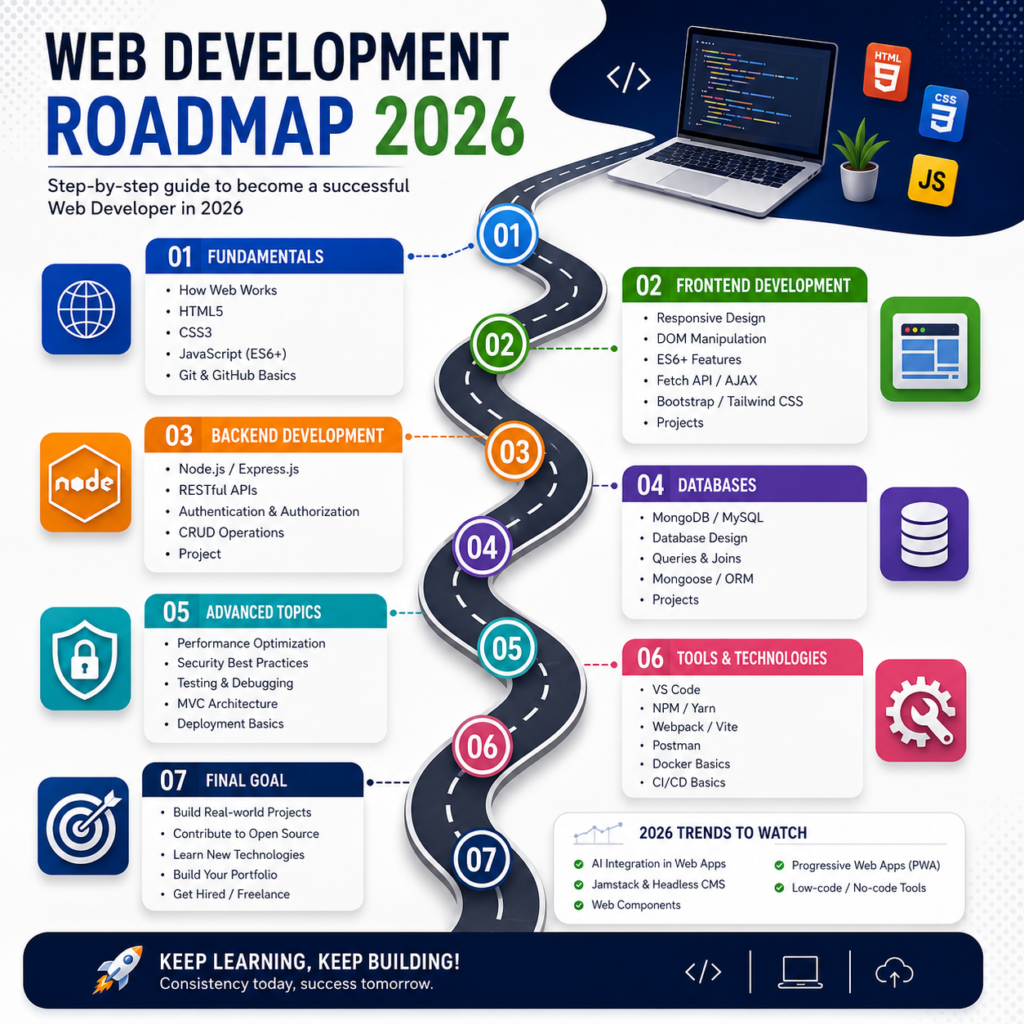
Instead of giving you a random list of programming languages and frameworks, this guide follows a practical learning sequence:
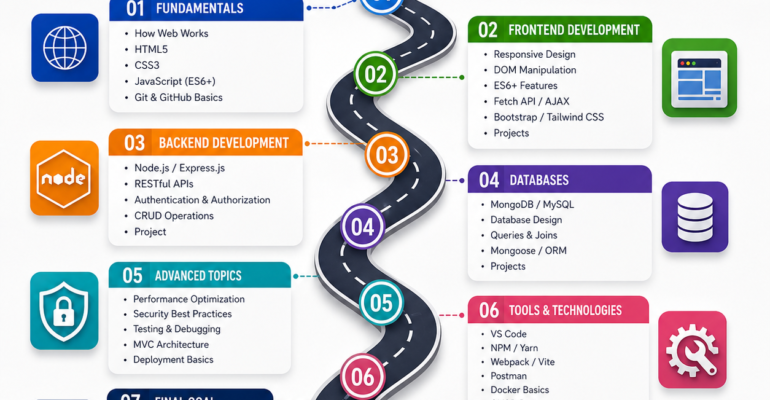
Web fundamentals → HTML → CSS → JavaScript → Projects → Git/GitHub → Frontend → Backend → Database → APIs → Authentication → Security → Testing → Deployment → Portfolio
You do not have to master everything at once.
Your goal should be to understand each layer, build something with it and then move to the next stage.
Whether you are a student, beginner, career changer, freelancer or someone planning to learn web development after 12th, this roadmap can help you understand the journey from your first HTML page to a complete full-stack web application.
Quick answer: If you are completely new to web development, start with HTML, then CSS, then JavaScript. Build small projects before moving to React or another framework. After you understand frontend development, choose one backend technology and one database, learn APIs and authentication, then build and deploy complete projects.
What Is Web Development?
Web development is the process of creating websites and web applications that people can access through a browser.
A simple website may contain:
- Home page
- About page
- Services
- Contact page
- Images
- Navigation
- Forms
A larger web application can contain much more:
- User registration
- Login systems
- Dashboards
- Online payments
- Search
- Database records
- APIs
- Notifications
- Admin panels
- File uploads
- User permissions
The technologies you need depend on what you want to build.
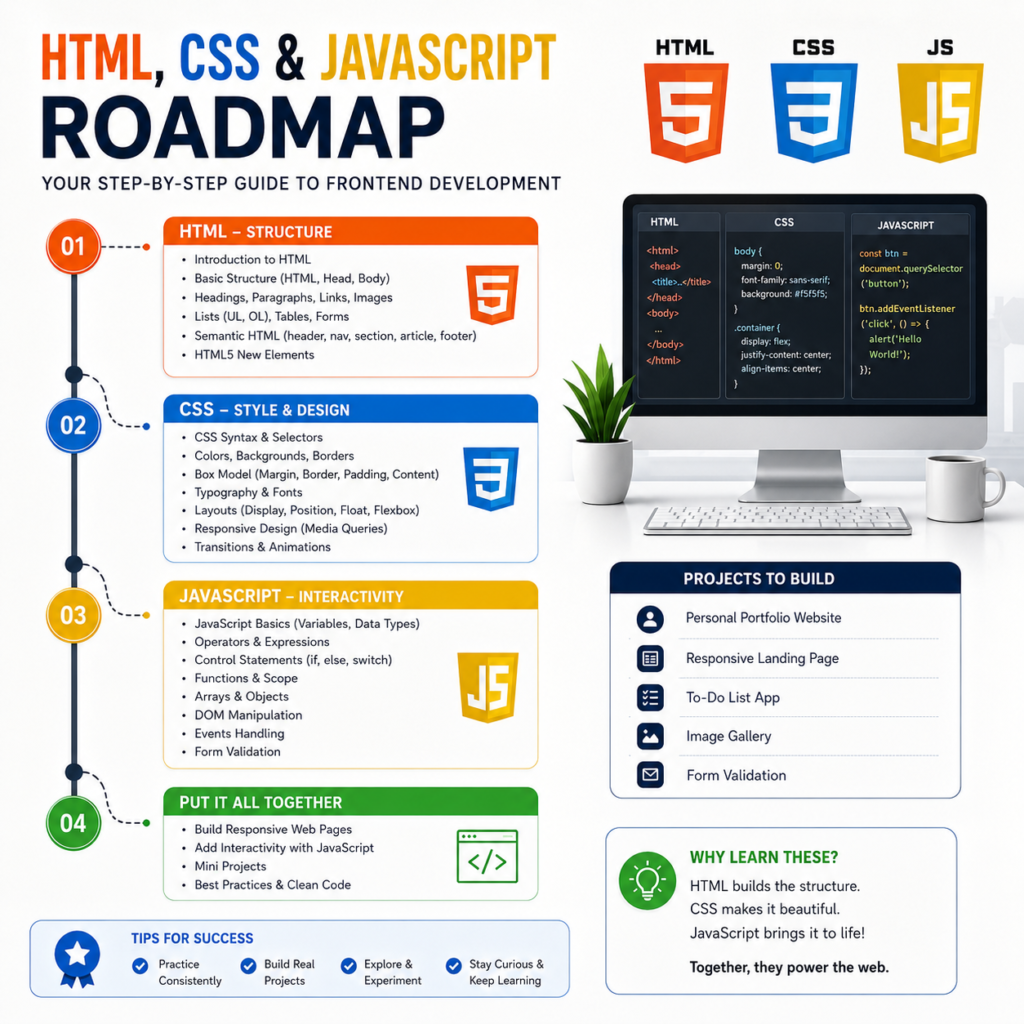
At the beginning, three technologies form the basic foundation of frontend web development:
| Technology | What it does |
|---|---|
| HTML | Creates the structure of a webpage |
| CSS | Controls design, layout and presentation |
| JavaScript | Adds interaction and programming logic |
A simple way to remember this is:
HTML = Structure
CSS = Design
JavaScript = Behaviour
For example, imagine an online course website.
HTML creates the course title, description, buttons and images.
CSS controls the colours, spacing, fonts, cards and responsive layout.
JavaScript can make the search box, menu, filters, form validation and other interactive features work.
MDN’s current web-development learning curriculum also treats HTML, CSS, JavaScript, accessibility and version control as important foundations for new developers.
Frontend vs Backend vs Full Stack Development
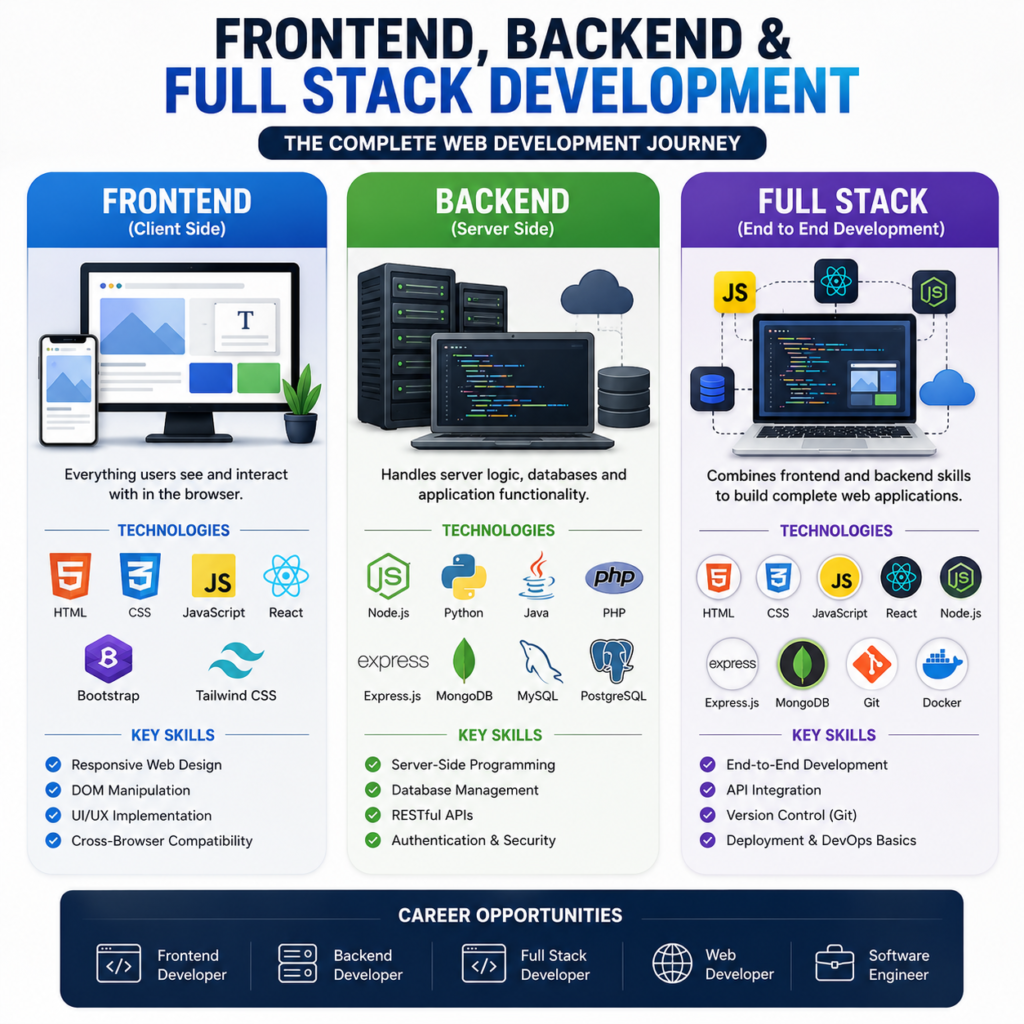
One of the first concepts you should understand is the difference between frontend, backend and full-stack development.
What Is Frontend Development?
Frontend development focuses on the part of a website or web application that users see and interact with.
Examples include:
- Navigation bars
- Buttons
- Forms
- Course cards
- Product pages
- Images
- Menus
- Dashboards
- Animations
- Search interfaces
A beginner frontend learning path usually starts with:
HTML → CSS → JavaScript
After building a strong foundation, you can learn a frontend library or framework such as React.
What Is Backend Development?
Backend development works behind the user interface.
Suppose a student fills out an online registration form.
The frontend displays:
Name → Email → Phone → Course → Submit
When the student clicks Submit, the backend can:
- Receive the request.
- Validate the information.
- Process the request.
- Store the data.
- Return a response.
Backend development can involve:
- Server-side programming
- Databases
- APIs
- Authentication
- Business logic
- Security
- File handling
- Server configuration
Common backend technologies include Node.js, PHP, Python, Java and others.
What Is Full Stack Development?
Full stack development combines frontend and backend development.
A simplified full-stack application can look like this:
Frontend
HTML + CSS + JavaScript/React
Backend
Node.js / PHP / Python
Database
MySQL / PostgreSQL / MongoDB
Deployment
Hosting / Server / Cloud
A full-stack developer does not necessarily need to know every programming language. The important thing is understanding how the different parts of a web application work together.
Web Development Roadmap 2026 at a Glance
Here is the complete learning path.
| Stage | What to learn | What you should build |
|---|---|---|
| 1 | How the web works | Understand browser-server communication |
| 2 | HTML | Static webpage |
| 3 | CSS | Responsive website |
| 4 | Accessibility | More usable webpage |
| 5 | JavaScript | Interactive webpage |
| 6 | JavaScript APIs | Data-driven application |
| 7 | Git and GitHub | Version-controlled project |
| 8 | React or frontend framework | Modern frontend application |
| 9 | Backend | Server-side application |
| 10 | Database | Data storage system |
| 11 | APIs and authentication | Connected application |
| 12 | Security and testing | Safer and more reliable application |
| 13 | Deployment | Live web application |
| 14 | Portfolio | Demonstrable project collection |
| 15 | Career preparation | Internship, job or freelance preparation |
The most important thing to notice is that projects are included throughout the roadmap.
Do not spend six months only watching tutorials and then decide to build your first project.
Build as you learn.
Firebase: https://firebase.google.com/
Google Cloud: https://cloud.google.com/
Step 1: Understand How the Web Works
Before learning frameworks, understand the basic journey of a website request.
When you type a website address into your browser, the browser communicates with a server and requests resources.
A simplified model is:
Browser → Request → Server → Response → Browser
You don’t need advanced networking knowledge at this stage.
Understand these basic terms.
Browser
A browser is software used to access websites.
Examples include Chrome, Firefox, Safari and Edge.
Server
A server provides the resources or processing required by a website or web application.
Domain
A domain is the human-readable address of a website.
For example:
iiceshimla.in
Hosting
Hosting provides infrastructure where a website or web application can be made available online.
HTTP and HTTPS
HTTP is a protocol used for communication between clients and servers.
HTTPS provides encrypted communication between the browser and website.
Why should beginners learn this?
Because later you will hear terms such as:
- HTTP request
- API request
- server response
- status code
- hosting
- deployment
- backend server
Understanding the basic client-server model now will make those topics easier later.
Step 2: Learn HTML
HTML should be your first major practical technology.
HTML provides the structure and meaning of web content.
Start with:
- HTML document structure
- Headings
- Paragraphs
- Links
- Images
- Lists
- Tables
- Forms
- Buttons
- Input fields
- Semantic elements
- Audio and video
- Basic metadata
Do not simply memorize HTML tags.
Understand what each element represents.
For example, a heading should be used as a heading because it represents a heading, not simply because it makes text appear large.
Learn semantic elements such as:
<header><nav><main><section><article><aside><footer>
This also creates a better foundation for accessibility and search-friendly page structure.
What Should You Build With HTML?
Start with simple projects.
Project 1: Personal Profile
Create:
- Name
- About section
- Education
- Skills
- Contact information
Project 2: Local Business Website
Create:
- Home
- About
- Services
- Gallery
- Contact
Project 3: Course Website
Create:
- Course list
- Course descriptions
- Contact/enquiry form
- About section
- Instructor section
At this stage, your design does not need to be impressive.
Your goal is to understand page structure.
HTML Checkpoint
You are ready to move forward when you can create a multi-section or multi-page website without copying every line from a tutorial.
Step 3: Learn CSS
Once you understand HTML structure, learn CSS.
CSS controls how HTML elements look and how they are arranged on the page.
Important topics include:
- Selectors
- Colours
- Fonts
- Text styling
- Backgrounds
- Borders
- Margin
- Padding
- Box model
- Width and height
- Display
- Position
- Flexbox
- Grid
- Media queries
- Responsive design
- Transitions
- Basic animations
Understand the CSS Box Model
One of the most important CSS concepts is the box model.
Think of an element as:
Content → Padding → Border → Margin
Understanding the box model will help you solve many common spacing and layout problems.
Learn Flexbox
Flexbox is useful for arranging elements along a row or column.
For example:
Logo | Home | About | Courses | Contact
It is commonly useful for:
- Navigation bars
- Headers
- Buttons
- Card layouts
- Footers
- Alignment
Learn CSS Grid
Grid is useful for two-dimensional layouts.
For example:
Card | Card | Card
Card | Card | Card
It is useful for:
- Course cards
- Product grids
- Image galleries
- Dashboards
Step 4: Learn Responsive Web Design
A website should not only work on your laptop.
People may access it through:
- Mobile phones
- Tablets
- Laptops
- Desktop computers
Responsive web design allows a layout to adapt to different screen sizes.
Learn:
- Media queries
- Flexible widths
- Responsive images
- Flexbox
- CSS Grid
- Mobile-first design
- Responsive navigation
- Flexible typography
After creating a website, test it at different screen sizes.
Ask yourself:
- Can I read the text on mobile?
- Does the navigation work?
- Are buttons easy to tap?
- Is anything overflowing?
- Are images breaking the layout?
- Are cards fitting properly?
- Does the website remain usable?
This practical testing is more useful than simply memorizing CSS properties.
Step 5: Learn Basic Web Accessibility
Accessibility should not be treated as something you add at the end.
Start developing accessible habits while learning HTML and CSS.
Learn:
- Semantic HTML
- Proper form labels
- Useful alternative text for meaningful images
- Keyboard accessibility
- Clear link text
- Good heading structure
- Readable contrast
- Accessible buttons and forms
The objective is simple:
Make your website easier for more people to use.
Good accessibility practices can also encourage better page structure and usability.
Step 6: Learn JavaScript
JavaScript is the next major stage.
HTML gives your website structure.
CSS controls presentation.
JavaScript allows you to create interaction and programming logic.
Start with:
- Variables
- Data types
- Operators
- Conditions
- Loops
- Functions
- Arrays
- Objects
- Scope
- Events
- DOM
- Forms
- Error handling
- Modules
- Asynchronous JavaScript
Do not try to memorize the entire language.
Instead, learn JavaScript by solving problems.
For example:
Problem
A user clicks a button.
JavaScript solution
Detect the click and change something on the page.
Another example:
Problem
A user submits an empty registration form.
JavaScript solution
Check the values and display an appropriate message.
This is how programming starts becoming practical.
Step 7: Understand the DOM
DOM stands for Document Object Model.
It provides a programming interface that allows JavaScript to work with webpage elements.
For example, JavaScript can:
- Change text
- Change classes
- Show or hide elements
- Respond to clicks
- Validate forms
- Create elements
- Remove elements
- Update information
Imagine a button:
Dark Mode
When the user clicks it, JavaScript can add a class to the page and change the appearance.
This is a simple example of JavaScript controlling the webpage.
Step 8: Learn Asynchronous JavaScript and APIs
Modern web applications rarely exist completely on their own.
They often communicate with external services or their own backend.
For example:
Frontend → API → Server → Database → Response → Frontend
Learn:
- JSON
- Fetch API
- Promises
- async/await
- HTTP methods
- Request and response
- Error handling
- API endpoints
A weather application is a good beginner example.
The user selects a city.
Your application sends a request to a weather API.
The API returns data.
JavaScript reads the response.
The page displays the weather information.
This is an important step because you are no longer building only static pages.
You are building applications that communicate with data.
Step 9: Build JavaScript Projects
Before moving into React or another frontend framework, build several projects using JavaScript.
Beginner JavaScript Projects
- Calculator
- Digital clock
- To-do list
- Quiz application
- Form validation
- Notes application
- Expense tracker
Intermediate JavaScript Projects
- Weather application
- Movie search application
- Product filter
- Shopping cart
- Student result system
- API-based dashboard
The purpose is not to create a million-dollar application.
The purpose is to experience real development problems.
You will eventually face questions such as:
Why is this button not working?
Why is the API returning an error?
Why is this value undefined?
Why does this work on desktop but not mobile?
Those problems are part of learning web development.
Step 10: Learn Git and GitHub
Once you have started building projects, learn Git.
Git is a version-control system that tracks changes to your project over time.
GitHub can be used to store repositories remotely and collaborate with other developers.
Learn these concepts:
- Repository
- Commit
- Branch
- Merge
- Clone
- Push
- Pull
- Remote repository
- Pull request
.gitignore
You don’t need to memorize dozens of commands.
Start with a basic workflow:
Create project → Initialize Git → Add files → Commit changes → Create remote repository → Push project
As your knowledge improves, learn branches and collaboration.
Why GitHub Is Useful for Students
A GitHub profile can help you demonstrate your practical work.
Instead of simply saying:
“I know JavaScript.”
you can show a JavaScript project.
A good repository can contain:
- Project description
- Features
- Technologies used
- Screenshots
- Installation instructions
- Live demo
- Known limitations
- Future improvements
This makes your learning visible.
Step 11: Choose a Frontend Framework or Library
After HTML, CSS and JavaScript fundamentals, you can move toward a modern frontend framework or library.
React is one possible path.
React uses components to build user interfaces and is widely used for modern frontend application development.
Before learning React, make sure you understand:
- Variables
- Functions
- Arrays
- Objects
- Events
- DOM concepts
- JavaScript modules
- Asynchronous JavaScript
- Basic API requests
Then start learning:
- Components
- JSX
- Props
- State
- Events
- Hooks
- Forms
- Conditional rendering
- Lists
- Routing
- API integration
Do not learn React by memorizing syntax.
Build something.
For example:
Course Management Dashboard
Components might include:
- Header
- Sidebar
- Course card
- Student card
- Search box
- Dashboard statistics
- Registration form
This helps you understand why components are useful.
Step 12: Should You Learn TypeScript?
TypeScript can be learned after you become comfortable with JavaScript.
TypeScript adds static typing features to JavaScript and can help identify certain problems during development.
For a complete beginner, this is usually a better sequence:
JavaScript → JavaScript projects → Frontend framework → TypeScript
Start with:
- Basic types
- Type inference
- Objects
- Arrays
- Functions
- Interfaces/types
- Union types
You do not need to master advanced TypeScript immediately.
The official TypeScript documentation also recommends JavaScript familiarity for learners who are new to the language.
Step 13: Learn Backend Development
Once you understand frontend development, start learning how applications work behind the interface.
Suppose you create an online student registration system.
The frontend collects:
- Name
- Phone
- Course
The backend receives that information.
It can:
- Validate the data.
- Process the request.
- Store the information.
- Return a response.
This is backend development.
You can choose from several technologies.
Option 1: Node.js
If you already know JavaScript, Node.js can be a natural backend route.
A common learning path is:
JavaScript → Node.js → Express → APIs → Database
Option 2: PHP
PHP is another established technology for server-side web development.
A possible learning path is:
HTML/CSS/JavaScript → PHP → MySQL → CRUD → Authentication → APIs
Option 3: Python
Python can also be used for web development through frameworks such as Django and Flask.
A possible path is:
Python → Web Framework → APIs → Database → Deployment
Important beginner advice
Do not try to learn Node.js, PHP and Python simultaneously.
Choose one primary backend technology.
Become comfortable with it.
You can learn another technology later.
Step 14: Learn Databases
Web applications need to store information.
For example, a student-management application might need:
- Student records
- Course records
- Registration records
- User accounts
- Attendance records
- Payment information
A database provides a structured way to store and retrieve this information.
SQL Databases
Learn:
- Tables
- Rows
- Columns
- Primary keys
- Foreign keys
- Relationships
- SELECT
- INSERT
- UPDATE
- DELETE
- JOIN
- Indexes
- Basic normalization
Common relational databases include:
- MySQL
- PostgreSQL
MongoDB
MongoDB is a document-oriented database commonly used in JavaScript-based full-stack applications.
If you choose the MERN route, the stack is:
MongoDB + Express + React + Node.js

Step 15: Understand CRUD
CRUD is one of the most important concepts for beginners.
CRUD means:
Create
Read
Update
Delete
Imagine a student-management application.
Create
Add a new student.
Read
Display students.
Update
Change student information.
Delete
Remove a student.
If you can build a complete CRUD application, you have already moved beyond basic static website development.
A CRUD project is also an excellent portfolio project because it demonstrates frontend, backend and database concepts together.
Step 16: Learn APIs
An API allows different software components to communicate.
For example:
React Frontend → GET /students → Backend → Database → Student Data → Frontend
Learn:
- GET
- POST
- PUT
- PATCH
- DELETE
- Request body
- Parameters
- Headers
- Status codes
- JSON
- Authentication
You do not need to memorize every possible HTTP status code.
Understand common request and response patterns and learn how to troubleshoot API problems.
Step 17: Learn Authentication and Authorization
Many real applications have users.
A basic user flow might look like:
Register → Login → Authentication → Dashboard
Authentication answers:
Who are you?
Authorization answers:
What are you allowed to do?
For example:
A student may be allowed to view their own profile.
An administrator may be allowed to manage multiple student records.
Learn the concepts behind:
- Registration
- Login
- Logout
- Password security
- Sessions or tokens
- Protected routes
- Roles
- Permissions
- Authorization
Do not simply copy an authentication tutorial.
Understand what the code is doing.
Step 18: Learn Web Security
Security should become part of your development habits.
Important beginner topics include:
- Input validation
- Authentication
- Authorization
- Password security
- Secure configuration
- Dependency management
- Error handling
- File upload security
- SQL injection awareness
- Cross-site scripting awareness
- Access control
OWASP’s Top 10 provides a useful awareness framework for major web application security risks.
You don’t need to become a cybersecurity specialist before building your first website.
But once you start creating applications with users and databases, security cannot be treated as an optional extra.
Step 19: Learn Testing and Debugging
A professional developer does much more than write code.
A large part of development involves:
Finding problems → Understanding problems → Fixing problems → Testing the solution
Learn how to use:
- Browser Developer Tools
- Console
- Network tab
- Breakpoints
- Error messages
- Server logs
- API testing tools
- Basic automated testing
When something breaks, don’t immediately ask an AI tool to rewrite everything.
First ask:
- What exactly is failing?
- Where does it fail?
- What changed?
- What does the error message say?
- Can I reproduce the problem?
- What did I expect to happen?
- What actually happened?
This debugging mindset becomes extremely valuable as projects become larger.
Step 20: Learn Deployment
A project that works only on your computer is useful for learning, but eventually you should learn how to make your project available online.
Learn the basics of:
- Domain names
- Hosting
- Production builds
- Environment variables
- HTTPS
- Server configuration
- Database deployment
- Application deployment
- Logs
- Backups
Start simple.
First deploy a static website.
Then deploy a frontend application.
Then deploy a backend API.
Finally, deploy a complete full-stack application.
This progression makes deployment much easier to understand.
Step 21: Build a Professional Portfolio
Your portfolio should demonstrate your ability to solve problems.
Don’t make the homepage say only:
“I am a passionate web developer.”
Show your work.
Project 1: Personal Portfolio
Demonstrates:
- HTML
- CSS
- Responsive design
Project 2: JavaScript Application
Demonstrates:
- JavaScript
- DOM
- Events
- Application logic
Project 3: API Project
Demonstrates:
- API requests
- JSON
- Async JavaScript
- Error handling
Project 4: Frontend Application
Demonstrates:
- Components
- State
- Routing
- API integration
Project 5: Full-Stack Application
Demonstrates:
- Frontend
- Backend
- Database
- Authentication
- CRUD
- Deployment
This progression is much stronger than having five nearly identical landing pages.
A Practical Full-Stack Project You Can Build
If you want one project that teaches many concepts, build a:
Student Course Management System
This project can grow with your knowledge.
Phase 1 — HTML
Create:
- Login page
- Registration page
- Course page
- Student dashboard
Phase 2 — CSS
Add:
- Responsive navigation
- Dashboard cards
- Tables
- Forms
- Mobile layout
Phase 3 — JavaScript
Add:
- Form validation
- Search
- Filters
- Dynamic menus
- Interactive components
Phase 4 — Backend
Create APIs for:
- Registration
- Login
- Students
- Courses
- Enrolments
Phase 5 — Database
Create data structures for:
- Users
- Students
- Courses
- Enrolments
Phase 6 — Authentication
Add:
- Login
- Logout
- Protected dashboard
- User roles
Phase 7 — Deployment
Publish the application online.
Phase 8 — Documentation
Create:
- README
- Screenshots
- Live URL
- Features
- Technology stack
- Challenges
- Future improvements
Now you have a project you can explain during an interview.
Web Development Roadmap for Students After 12th
If you have recently completed 12th and want to learn web development, don’t try to learn every technology immediately.
Start with:
HTML → CSS → JavaScript → Projects → Git/GitHub → Frontend → Backend → Database → Full Stack
Your academic background does not mean you need to start with advanced frameworks.
If you are from science, commerce, arts, management or another field, you can still begin with the same fundamentals.
The important thing is consistent practice.
Web Development Roadmap for Non-CS Students
A computer science degree is not a prerequisite for understanding the fundamentals of web development.
A non-CS learner can start with:
Month/Stage 1
Understand:
- Basic computer concepts
- Internet basics
- HTML
- CSS
Stage 2
Learn:
- JavaScript
- DOM
- Git
- GitHub
Stage 3
Build:
- Portfolio website
- Business website
- JavaScript application
Stage 4
Choose:
- Frontend
- Backend
- Full Stack
Stage 5
Build a complete project.
The important thing is not trying to compete with experienced developers immediately.
Focus on improving your own ability to build.
Should You Learn MERN, PHP or Python?
There is no single technology stack that every beginner must learn.
Your choice should depend on your goals.
| Goal | Possible learning path |
|---|---|
| Frontend developer | HTML + CSS + JavaScript + React |
| JavaScript full stack | React + Node.js + Express + MongoDB |
| PHP web development | HTML + CSS + JavaScript + PHP + MySQL |
| Python web development | Python + Django/Flask + database |
| General full stack | HTML + CSS + JS + one frontend + one backend |
The important thing is to avoid technology overload.
You do not need to learn:
PHP + Node.js + Python + React + Angular + Vue + Django + Laravel + MongoDB + MySQL
all at the same time.
Choose one route.
Build projects.
Then expand your skills.
How AI Changes Web Development in 2026
AI tools are becoming increasingly useful in development workflows.
You can use AI to:
- Explain code
- Generate examples
- Find possible bugs
- Suggest improvements
- Explain error messages
- Create test cases
- Help understand documentation
- Brainstorm project ideas
- Speed up repetitive tasks
But beginners should avoid becoming completely dependent on AI-generated code.
A better workflow is:
Understand the problem → Try to solve it → Read documentation → Use AI when useful → Review the generated code → Run it → Test it → Debug it
Understand what you are keeping
For example, instead of asking:
“Write my entire login system.”
ask:
“Explain how authentication works and show me a simple example I can study.”
The second approach helps you learn.
AI should increase your productivity without replacing your understanding of fundamentals.
How Long Does It Take to Learn Web Development?
There is no reliable universal timeline.
Your learning speed depends on:
- Previous programming experience
- Time available each week
- Quality of practice
- Project complexity
- Guidance
- Consistency
- Problem-solving ability
Instead of asking:
“Can I become a web developer in three months?”
ask:
“What can I build after three months of consistent practice?”
Your progression might look like:
Early stage
You can build static responsive websites.
Next stage
You can build interactive JavaScript applications.
Intermediate stage
You can connect frontend applications to APIs.
Advanced beginner stage
You can create backend applications and work with databases.
Job-preparation stage
You can build, deploy, explain and maintain complete projects.
The milestone should be what you can build, not simply how many months you have studied.
Web Development Course in Shimla
How Do You Know When You Are Job-Ready?
You are moving toward internship or junior-level readiness when you can:
- Build a website without copying every tutorial step
- Explain your code
- Use Git
- Use GitHub
- Debug common errors
- Work with APIs
- Understand databases
- Create responsive interfaces
- Build forms
- Understand authentication
- Deploy projects
- Read documentation
- Learn unfamiliar technologies
- Explain projects you have built
You do not need to know everything.
You need to demonstrate that you can learn, build, debug and improve.
Common Web Development Mistakes Beginners Should Avoid
1. Starting With React
React is useful, but learning it before JavaScript fundamentals can create unnecessary confusion.
Learn JavaScript first.
2. Watching Tutorials Without Building
Watching tutorials is not the same as developing.
After learning a concept, build something.
3. Copying Projects Without Understanding Them
Following a tutorial is fine.
But after completing it, modify it.
Change the design.
Add a feature.
Remove a feature.
Break something.
Fix it.
That is when passive learning becomes active learning.
4. Learning Too Many Technologies
Don’t switch between five programming languages every week.
Choose a primary path.
5. Ignoring Git
Don’t wait until your first job to learn version control.
Use Git for serious projects from the beginning.
6. Ignoring Mobile Design
A website that works only on a desktop computer is incomplete.
Test mobile layouts.
7. Ignoring Accessibility
Use semantic HTML, meaningful labels and accessible interaction patterns.
8. Ignoring Security
Once your application handles users or databases, security becomes essential.
9. Building Only Clones
Cloning an existing application can teach implementation.
But build some original projects too.
A project that solves a real problem gives you something meaningful to discuss in an interview.
10. Chasing Every New Framework
Frameworks change.
Foundational skills remain valuable.
HTML, CSS, JavaScript, HTTP, databases, Git, debugging and problem-solving should remain your foundation.
A Better Weekly Web Development Learning Method
Instead of spending every study session watching tutorials, use a practical cycle.
30% — Learn
Study a focused concept.
50% — Build
Write code yourself.
20% — Debug and Review
Ask:
- What did I understand?
- What failed?
- Why did it fail?
- What can I improve?
For example, if you have two hours:
35 minutes: Learn
60 minutes: Build
25 minutes: Debug and review
This gives you a much better balance between theory and practice.
Beginner Project Checklist
Before calling a project finished, check:
- Does it work?
- Does it work on mobile?
- Are forms validated?
- Are links working?
- Are images displayed correctly?
- Are buttons understandable?
- Are there avoidable console errors?
- Is the code organized?
- Is the project stored in Git?
- Is the project documented?
- Is there a live demo where practical?
- Can I explain how the project works?
Do not measure your progress only by the number of projects.
Measure it by how well you understand them.
Web Development Course in Shimla: Learning Through IICE
If you are in Shimla and prefer structured learning instead of studying entirely on your own, IICE Computer Education provides web-development-related training.
The current IICE Full Stack Web Development page covers areas including HTML, CSS, JavaScript, frontend technologies, backend development, databases, Git/GitHub and project-based learning.
IICE also currently lists a MERN Stack Development Course with AI covering technologies including MongoDB, Express.js, React.js and Node.js, along with APIs, authentication, Git/GitHub, projects and deployment-related topics.
The right choice between self-learning and structured training depends on how you learn best.
Before joining any web-development course, ask:
- What technologies are actually taught?
- Will I write the code myself?
- Are practical projects included?
- Will I learn Git and GitHub?
- Will I work with databases?
- Will I build APIs?
- Will I deploy projects?
- Can I ask questions when I get stuck?
- Will I have projects for my portfolio?
- Does the curriculum match my career goal?
For learners interested in structured training in Shimla, explore the relevant IICE Full Stack Web Development program and current course details before making a decision.
Frequently Asked Questions
Can I learn web development as a complete beginner?
Yes. Start with web fundamentals, HTML, CSS and JavaScript. You don’t need to begin with React or backend development.
What should I learn first in web development?
A practical sequence is:
Web fundamentals → HTML → CSS → Responsive Design → JavaScript → Projects → Git/GitHub → Frontend Framework → Backend → Database → APIs → Deployment
Should I learn HTML before JavaScript?
Yes. HTML gives you the structure of webpages, while JavaScript adds programming logic and interaction.
Should I learn CSS before JavaScript?
It is useful to learn the CSS fundamentals before going deeply into JavaScript. You don’t need to master every CSS feature first.
Should I learn JavaScript before React?
Yes.
A strong JavaScript foundation makes React considerably easier to understand.
Is React necessary to become a web developer?
No.
React is one possible frontend technology. You can build websites and applications using other technologies as well.
Is MERN necessary for full-stack development?
No.
MERN is one full-stack technology combination.
Other combinations can use PHP, MySQL, Python, PostgreSQL and other technologies.
Do I need Python for web development?
No.
Python is useful for web development, but it isn’t mandatory.
Do I need TypeScript as a beginner?
Not immediately.
Learn JavaScript first. Once you are comfortable with JavaScript and a frontend framework, TypeScript can be added to your learning path.
How many projects should I build?
There is no magic number.
A useful progression is:
- Static website
- Responsive website
- JavaScript application
- API-based application
- Frontend framework project
- Full-stack application
Focus on understanding each project.
Do I need Git and GitHub?
Git is an important development skill for managing project history and collaborating on code. GitHub can help you store and share repositories.
You should start learning Git once you begin working on serious projects.
Can I learn web development after 12th?
Yes.
Start with HTML, CSS and JavaScript, then gradually move into frontend, backend and databases.
Can a non-CS student learn web development?
Yes.
You can start from the fundamentals regardless of your academic background.
Can AI help me learn web development?
Yes.
AI can explain code, suggest debugging approaches and help you understand concepts.
However, you should still learn the fundamentals and verify the code AI provides.
What is the best project for a beginner?
Start with a project that is slightly more difficult than your current ability.
A personal website is a good first project.
A course website, expense tracker, API application or student-management system can be useful as you progress.
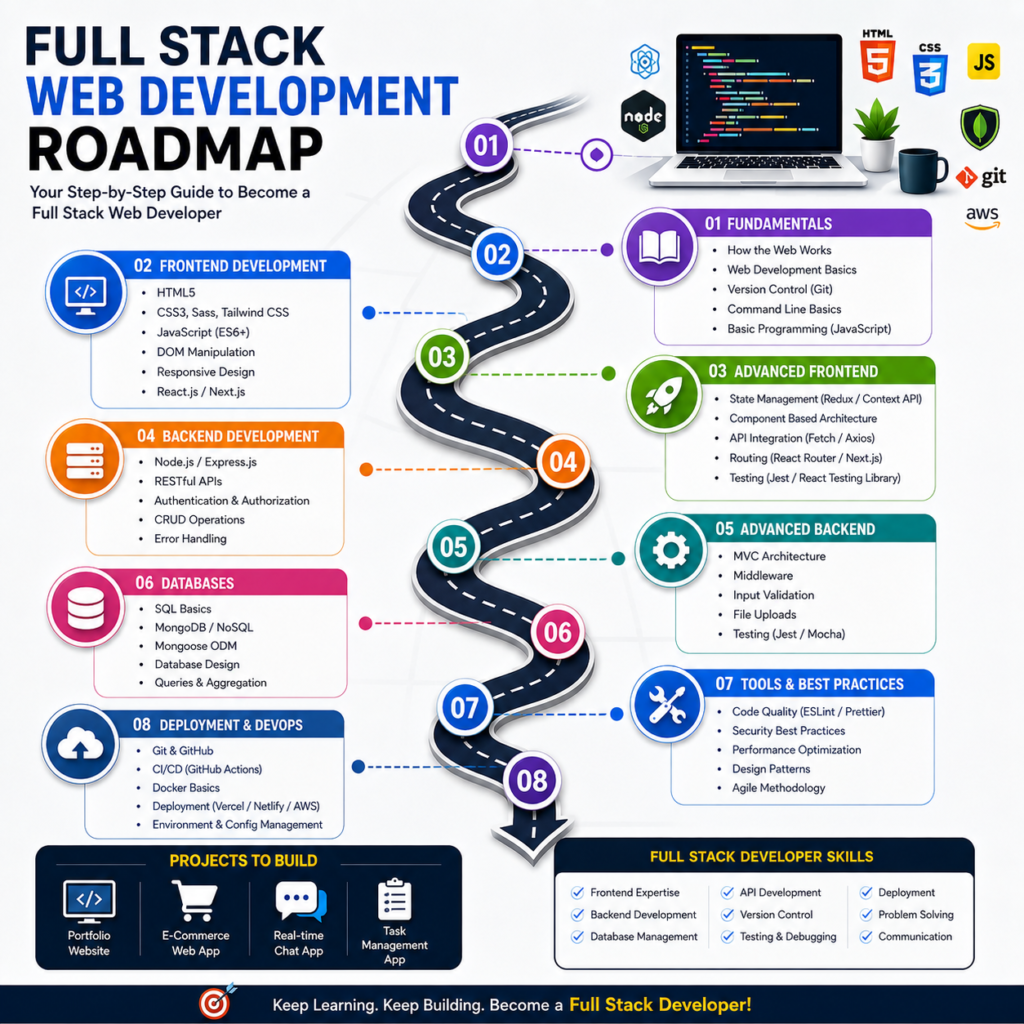
Final Web Development Roadmap 2026
If you remember only one sequence from this guide, remember this:
Understand the Web
HTML, CSS → Responsive Design → Accessibility → JavaScript → JavaScript Projects → Git + GitHub
Frontend Framework → TypeScript → Backend → Database → APIs → Authentication → Security
Testing → Deployment → Portfolio → Internship / Job / Freelancing
You don’t need to rush through this roadmap.
The strongest beginners are not necessarily the people who know the largest number of technologies. They are the people who can take a problem, break it into smaller parts, build a solution, find errors, read documentation and improve the result.
That is the real skill behind web development.
If you are starting in 2026, don’t make your first goal:
“I need to learn every technology.”
Make your first goal:
“I want to build one useful website without copying it.”
Then build another.
Make it responsive.
Make it interactive.
Connect it to an API.
Add a backend.
Connect a database.
Add authentication.
Deploy it.
Document it.
That progression turns a beginner into someone who can demonstrate practical web-development ability.
For students and learners in Shimla looking for structured training, IICE Computer Education provides web-development learning options that can be explored alongside this roadmap.
IICE Computer Education
Shimla, Himachal Pradesh
Phone: +91 98162 11278
Conclusion
A good web development roadmap is not a list of 50 technologies.
It is a sequence that helps you build increasingly useful things.
Start with: HTML + CSS
Then learn: JavaScript
Then: Projects + Git/GitHub
Then choose: Frontend + Backend
Then learn: Database + APIs + Authentication
Finally: Security + Testing + Deployment + Portfolio
Don’t wait until you know everything before building.
Build while learning. Make mistakes.
Read documentation.
Debug your code.
Use AI intelligently.
Improve your projects.
And most importantly, learn to explain what you have built.
That is how you move from simply studying web development to actually becoming a web developer.