
Web Development Course in Shimla: Syllabus, Fees, Training & Career Guide 2026


Web Development Course in Shimla: Syllabus, Fees, Training & Career Guide 2026
Have you ever wondered how websites like Amazon, Instagram, YouTube or online shopping websites work?
When you open a website, you see text, images, buttons, menus, forms and videos. But behind everything you see, there is a lot of coding and technology working together.
This is where web development comes in.
If you are a student, graduate, job seeker or beginner who wants to learn how websites are created, a Web Development Course in Shimla can help you start learning these skills step by step.
You do not need to be a computer expert to start.
You can begin with simple concepts such as HTML and CSS and then slowly learn JavaScript, databases, backend programming, APIs and website deployment.
At IICE Computer Education Shimla, web development training focuses on learning through coding practice, assignments and practical projects instead of only studying theory.
In this guide, we will explain web development in very simple language, including the syllabus, technologies, practical training, career opportunities, beginner requirements, course selection tips and the location of IICE Computer Education in Shimla.
What Is Web Development?
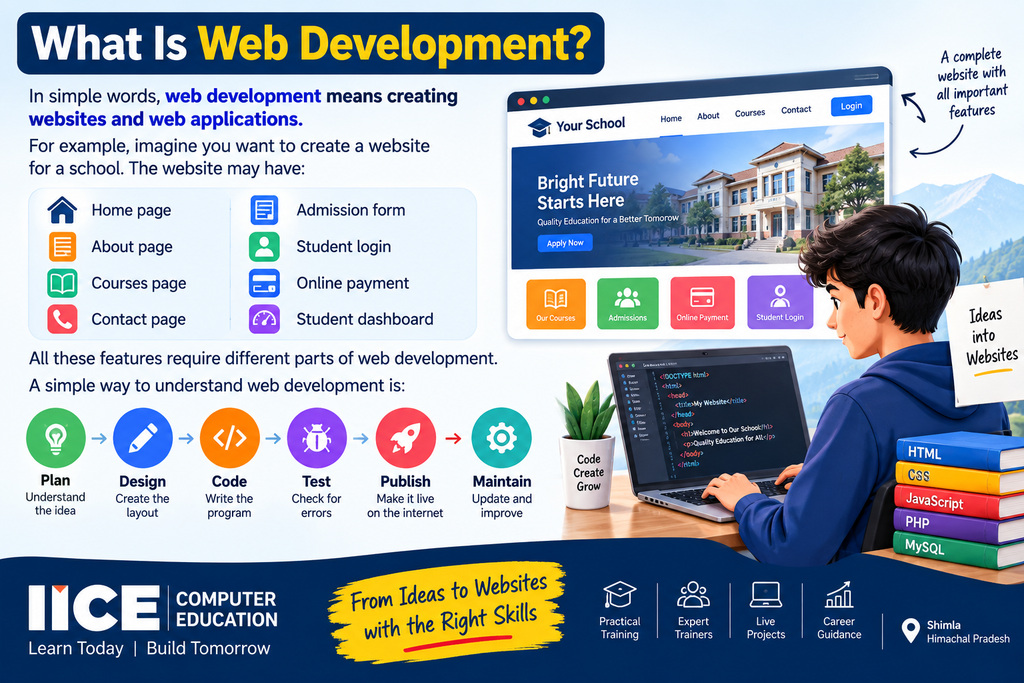
In simple words, web development means creating websites and web applications.
For example, imagine you want to create a website for a school.
The website may have:
- Home page
- About page
- Courses page
- Contact page
- Admission form
- Student login
- Online payment
- Student dashboard
All these features require different parts of web development.
A simple way to understand web development is:
Plan → Design → Code → Test → Publish → Maintain
A web developer uses programming languages and development tools to turn an idea into a working website or web application.
What Is the Difference Between Web Designing and Web Development?
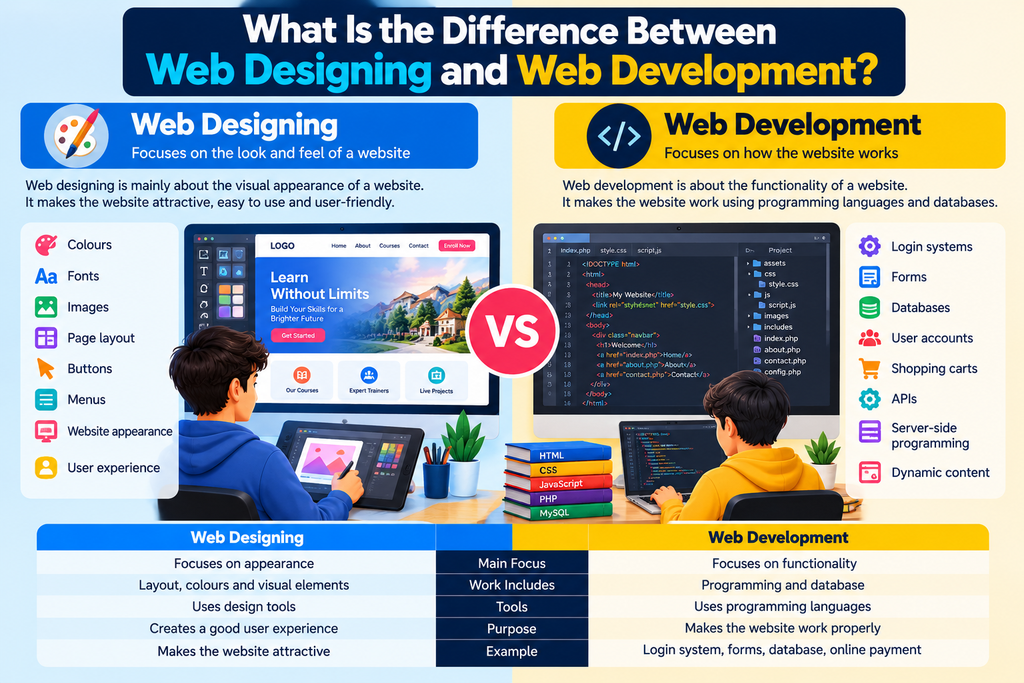
Many beginners confuse web designing with web development.
They are related, but they are not exactly the same.
Web Designing
Web designing mainly focuses on how a website looks.
For example:
- Colours
- Fonts
- Images
- Page layout
- Buttons
- Menus
- Website appearance
- User experience
Web Development
Web development focuses more on how the website works.
For example:
- Login systems
- Forms
- Databases
- User accounts
- Shopping carts
- APIs
- Server-side programming
- Dynamic content
Think about a car.
The design is what the car looks like.
The development and engineering are what make the car work.
Modern websites usually need both good design and good development.
Types of Web Development
Web development can generally be divided into three major areas.
1. Frontend Development
Frontend means the part of a website that users can see and interact with.
For example, when you visit a website and see:
- Navigation menu
- Images
- Text
- Buttons
- Forms
- Cards
- Videos
- Animations
you are looking at the frontend.
Common frontend technologies include:
- HTML
- CSS
- JavaScript
- Bootstrap
- React
2. Backend Development
Backend development works behind the website.
A user may not see the backend directly, but it performs important tasks.
For example, when you log into a website, the backend can check your username and password.
Backend development can involve:
- PHP
- Node.js
- Python
- Databases
- APIs
- Server-side programming
3. Full Stack Development
Full stack development combines frontend and backend development.
A full stack developer understands how different parts of a website work together.
For example:
Frontend
HTML + CSS + JavaScript
↓
Backend
PHP / Node.js / other backend technologies
↓
Database
MySQL / other databases
↓
Server
Hosting + Deployment
This is why many students interested in professional web development choose a Full Stack Web Development Course in Shimla.
Why Learn Web Development?
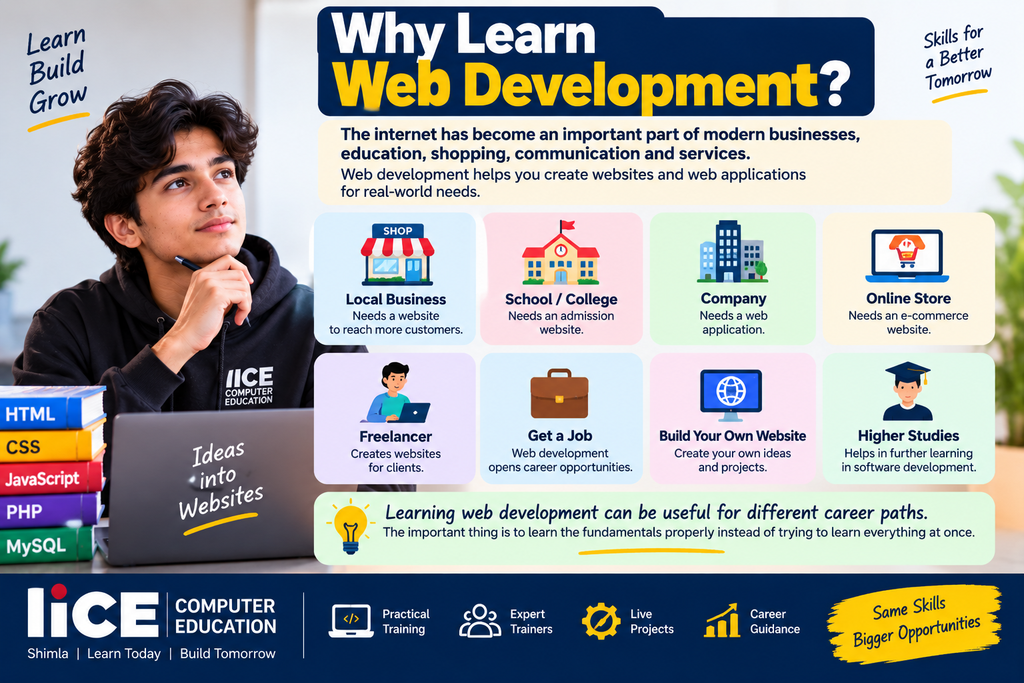
The internet has become an important part of modern businesses, education, shopping, communication and services.
A local business may need a website.
A school may need an admission website.
A company may need a web application.
An online store may need an e-commerce website.
A freelancer may create websites for clients.
Learning web development can therefore be useful for different career paths.
Some students learn web development to get a job.
Others learn it for freelancing.
Some want to build their own website.
Others want to continue studying software development.
The important thing is to learn the fundamentals properly instead of trying to learn everything at once.
Web Development Course in Shimla for Beginners
One of the biggest questions beginners ask is:
“Can I learn web development if I don’t know coding?”
Yes.
Beginners can start from the basics.
You don’t need to know advanced programming before starting HTML and CSS.
A beginner-friendly learning path can look like this:
Computer Basics
↓
HTML
↓
CSS
↓
Responsive Design
↓
JavaScript
↓
Frontend Development
↓
Backend Development
↓
Database
↓
APIs
↓
Live Projects
↓
Website Deployment
This step-by-step approach makes web development easier to understand.
Web Development Course Syllabus in Shimla
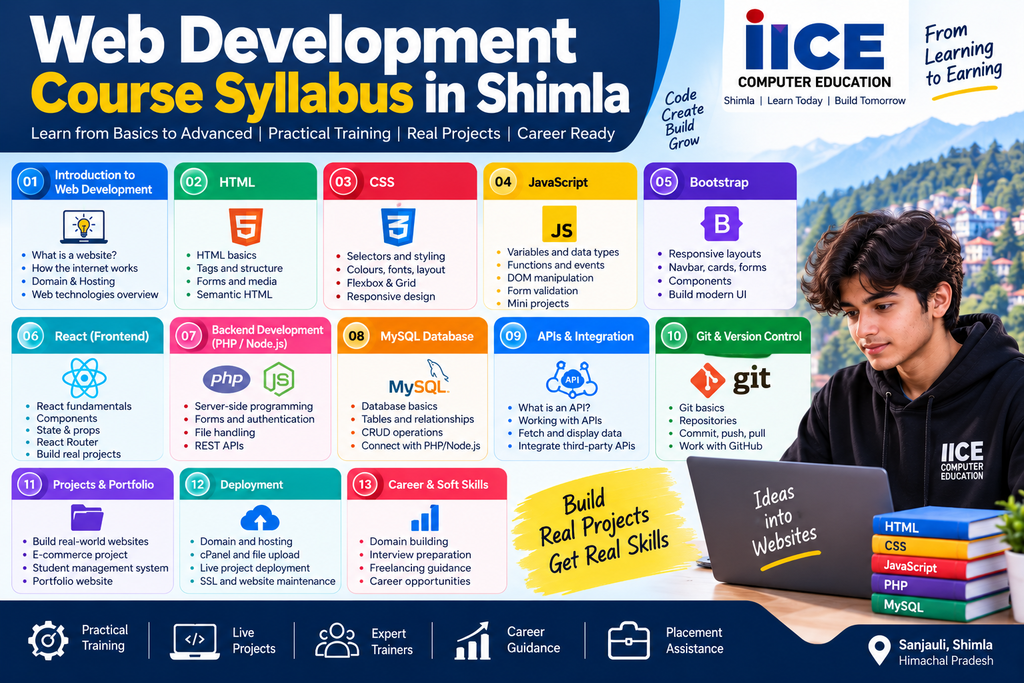
A good course should not only teach individual programming languages.
Students should understand how those technologies work together.
At IICE Computer Education, the web development learning path can include frontend, backend, database, APIs, deployment and practical project work. The institute’s current course information lists technologies such as HTML, CSS, JavaScript, Bootstrap, React, PHP, MySQL, Node.js, APIs and Git.
Here is a simple explanation of the major modules.
Module 1: Introduction to Web Development
Students first understand:
- What is a website?
- What is a web application?
- How does the internet work?
- What is a browser?
- What is a server?
- What is a domain?
- What is web hosting?
- What is HTTP and HTTPS?
These basics help students understand what happens when they open a website.
Module 2: HTML
HTML stands for HyperText Markup Language.
HTML provides the structure of a webpage.
Students can learn:
- HTML structure
- Headings
- Paragraphs
- Links
- Images
- Lists
- Tables
- Forms
- Buttons
- Audio
- Video
- Semantic HTML
- HTML5 elements
For example, HTML tells the browser:
“This is a heading.”
“This is an image.”
“This is a button.”
“This is a form.”
Module 3: CSS
CSS stands for Cascading Style Sheets.
CSS controls how a webpage looks.
Students can learn:
- Colours
- Fonts
- Backgrounds
- Borders
- Margins
- Padding
- Flexbox
- Grid
- Positioning
- Transitions
- Animations
- Responsive design
HTML creates the structure.
CSS makes the structure attractive.
Module 4: Responsive Web Design
Today people use websites on:
- Computers
- Laptops
- Tablets
- Mobile phones
A website should work properly on different screen sizes.
Students learn how to create responsive websites that adjust to different devices.
This includes:
- Mobile layouts
- Tablet layouts
- Desktop layouts
- Responsive menus
- Responsive images
- Flexible grids
Module 5: JavaScript
JavaScript makes websites interactive.
For example, JavaScript can be used for:
- Form validation
- Buttons
- Menus
- Calculators
- Pop-ups
- Sliders
- Interactive forms
- Dynamic content
Students can gradually learn programming concepts such as:
- Variables
- Data types
- Conditions
- Loops
- Functions
- Arrays
- Objects
- Events
- DOM
- APIs
Module 6: Bootstrap and Frontend Frameworks
Students can learn tools that help them build modern interfaces faster.
Bootstrap can help with:
- Responsive layouts
- Buttons
- Cards
- Navigation bars
- Forms
- Grids
Students may also progress toward modern frontend technologies such as React depending on their learning level and course structure.
Module 7: PHP and Backend Development
After learning frontend development, students can move towards backend programming.
PHP is one of the technologies used for server-side web development.
Students can learn:
- PHP fundamentals
- Variables
- Conditions
- Loops
- Functions
- Forms
- Sessions
- Authentication
- Database connection
- CRUD operations
CRUD means:
Create
Read
Update
Delete
These four operations are commonly used in database-driven websites.
Module 8: MySQL and Database
Many websites need to store information.
For example, an institute website may need to store:
- Student names
- Phone numbers
- Course details
- Admission information
- Login information
This information can be stored in databases.
Students can learn:
- Database basics
- Tables
- Rows
- Columns
- SQL
- SELECT
- INSERT
- UPDATE
- DELETE
- Relationships
- Database connections
Module 9: APIs
API stands for Application Programming Interface.
You can think of an API as a bridge that allows different software systems to communicate.
For example, a website may communicate with:
- Payment systems
- Maps
- Login systems
- Weather services
- CRM software
- Other applications
Understanding APIs becomes important as students move from basic websites to modern web applications.
Module 10: Git and Version Control
Git helps developers manage changes in their code.
Students can learn basic concepts such as:
- Repository
- Commit
- Branch
- Push
- Pull
- Version control
Git is commonly used in professional software development environments.
Module 11: Website Hosting and Deployment
Creating a website on your computer is only one part of the process.
You also need to make the website available online.
Students can learn the basics of:
- Domain names
- Hosting
- cPanel
- FTP
- Website files
- Database deployment
- SSL
- HTTPS
- Website maintenance
This gives students an understanding of how a website moves from a local computer to the internet.
Practical Projects in Web Development
Reading code is not enough.
Students need to write code and build things.
That is why project-based learning can be an important part of a web development course.
Possible beginner projects include:
Project 1: Personal Portfolio
Students can create a personal website containing:
- About section
- Skills
- Education
- Projects
- Contact form
Project 2: College Website
Students can create:
- Home page
- About page
- Courses
- Faculty
- Contact page
Project 3: Business Website
Students can build a website for a local business.
Project 4: Blog Website
Students can learn how posts, categories and user interfaces work.
Project 5: Student Management System
Students can understand how frontend, backend and databases work together.
Project 6: E-Commerce Website
Students can learn concepts such as:
- Products
- Categories
- Cart
- User accounts
- Orders
- Database
The exact projects can vary according to the course and trainer.
Why Practical Training Matters in Web Development
Suppose you read ten books about swimming.
You may understand the theory.
But you still need to enter the water to actually learn swimming.
Coding is similar.
You can watch hundreds of tutorials, but you need to write code yourself.
During practical training, students can:
- Write code
- Make mistakes
- Find errors
- Fix bugs
- Build websites
- Work on assignments
- Create projects
- Build a portfolio
This is why practical learning is an important part of professional web development training.
Why Choose IICE Computer Education for Web Development in Shimla?
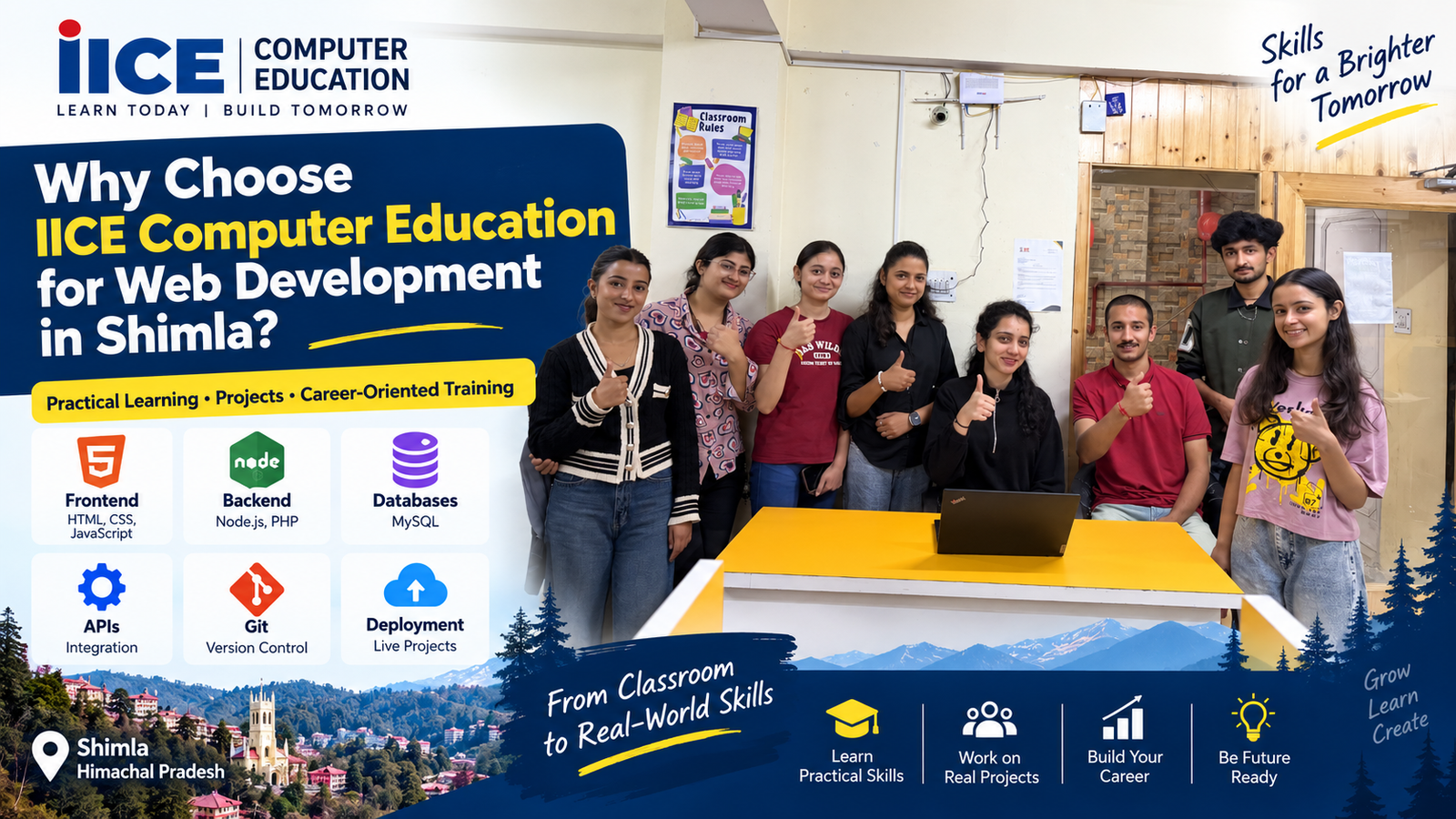
If you are searching for a Web Development Course in Shimla, the institute you choose should provide more than classroom theory.
IICE Computer Education Shimla provides professional computer and technology training with practical learning, projects and career-oriented training. Its current course information describes training covering frontend, backend, databases, APIs, Git and deployment-related concepts.
Some of the areas students can explore at IICE include:
- Web Development
- Full Stack Development
- Digital Marketing
- Data Analytics
- Artificial Intelligence
- Data Science
- Graphic Designing
- Python
- Tally with GST
- Ethical Hacking
- Financial Management
The institute’s website also identifies it as an ISO-certified and government-registered institute.
The focus should not simply be on completing a syllabus.
The goal is to help students understand technology and develop practical skills.
Where Is IICE Computer Education in Shimla?
IICE Computer Education is located at:
IICE Computer Education
Shiv Kuteer, near Sanjauli Chowk, North Oak, Sanjauli, Shimla, Himachal Pradesh – 171006
The current business listing also identifies the institute at Shiv Kuteer near Sanjauli Chowk, North Oak, Sanjauli.
You can use the following Google Maps location to get the latest directions:
Get Directions to IICE Computer Education on Google Maps
How to Reach IICE Computer Education from Mall Road Shimla?
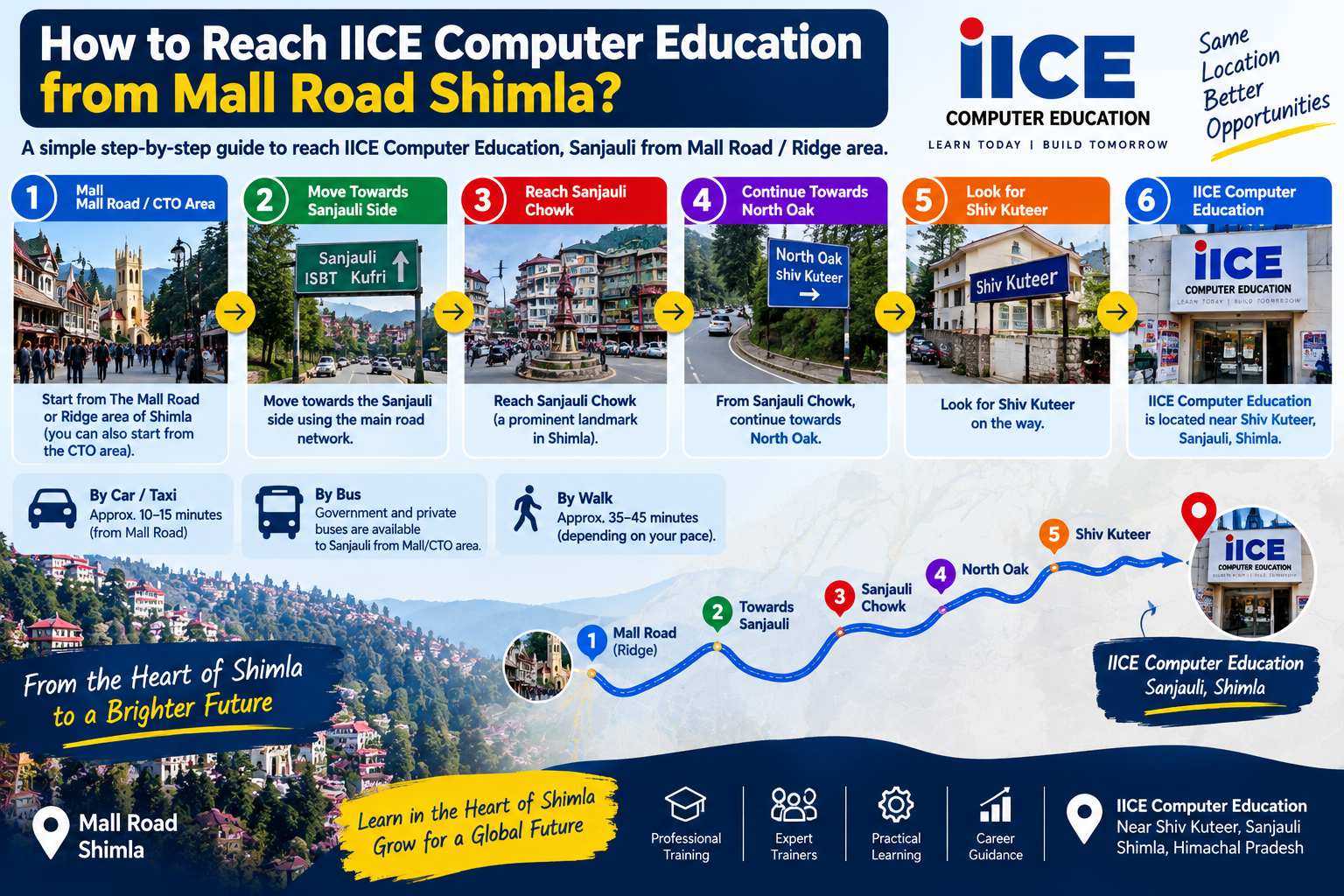
If you are coming from The Mall Road or Ridge area of Shimla, you first need to move towards the road network connecting the central Shimla area with Sanjauli.
Sanjauli is connected with the central Shimla area through the city’s road network, and Shimla’s official transport information lists Sanjauli among the areas served by government taxi services from the Mall/CTO area.
A simple way to explain the route to students is:
Mall Road / CTO area
↓
Move towards the Sanjauli side
↓
Reach Sanjauli Chowk
↓
Continue towards North Oak
↓
Look for Shiv Kuteer
↓
IICE Computer Education
The institute is near Sanjauli Chowk in North Oak, which makes Sanjauli Chowk an important landmark when asking for directions.
If you are travelling by taxi, you can simply tell the driver:
“IICE Computer Education, Shiv Kuteer, near Sanjauli Chowk, North Oak.”
For the exact current road route, it is best to open the Google Maps location above because traffic restrictions and road conditions in Shimla can change.
Who Can Join a Web Development Course in Shimla?
Web development is not only for computer science students.
A beginner-friendly course can be useful for:
- Students after 10th
- Students after 12th
- College students
- Graduates
- Job seekers
- Freelancers
- Entrepreneurs
- Digital marketing students
- Business owners
- People interested in coding
The most important things are interest, regular practice and willingness to learn.
Do You Need Coding Knowledge Before Joining?
No.
Beginners can start with basic concepts.
For example, you may start with:
HTML → CSS → JavaScript
After understanding these technologies, you can move towards:
Backend → Database → APIs → Full Stack Development
This is much easier than trying to learn advanced programming from day one.
Career Options After Web Development Course
After learning web development and building practical skills, students can explore different career paths.
Possible roles include:
- Web Developer
- Frontend Developer
- Backend Developer
- Full Stack Developer
- WordPress Developer
- PHP Developer
- Junior Web Developer
- Web Development Intern
- Website Designer
- Software Developer
Students can also explore freelancing and independent website projects.
However, completing a course alone does not automatically guarantee a job.
Skills, projects, communication, interview preparation and practical experience all matter.
Web Development and Freelancing
Web development can also be useful for freelancing.
For example, a freelancer may create websites for:
- Restaurants
- Hotels
- Schools
- Coaching institutes
- Shops
- Doctors
- Local businesses
- Startups
A beginner can start with small projects and gradually build a portfolio.
A portfolio is important because clients often want to see what you can actually build.
How to Build a Web Developer Portfolio
A student can create a portfolio containing:
- Personal introduction
- Technical skills
- Projects
- GitHub profile
- Website demos
- Contact information
- Resume
Instead of saying:
“I know HTML, CSS and JavaScript.”
you can show:
“Here are five websites I created.”
Projects provide practical evidence of your skills.
Web Development Course After 12th in Shimla
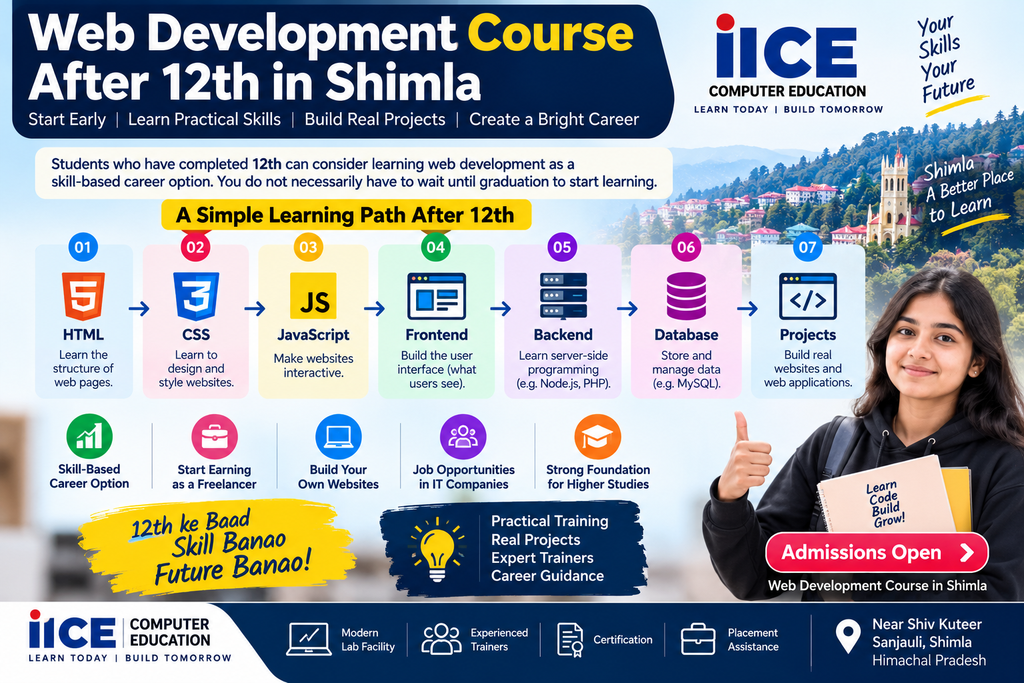
Students who have completed 12th can consider learning web development as a skill-based career option.
You do not necessarily have to wait until graduation to start learning.
A student can begin with:
HTML
↓
CSS
↓
JavaScript
↓
Frontend
↓
Backend
↓
Database
↓
Projects
This can also help students understand whether they enjoy coding before choosing more advanced software development studies.
Web Development Course After Graduation
Graduates from different educational backgrounds can also learn web development.
For example, students from:
- BCA
- BSc
- BA
- BCom
- BBA
- Other graduation backgrounds
may choose to develop practical web skills depending on their career goals.
For students who already have some programming knowledge, the learning process can move faster.
How Long Does It Take to Learn Web Development?
There is no single fixed answer.
It depends on:
- Your current computer knowledge
- Previous coding experience
- Daily practice
- Course structure
- Number of practical projects
- Time spent practising outside class
A beginner should focus less on finishing quickly and more on understanding each concept.
The goal should be:
Learn → Practice → Build → Test → Improve
What Should You Check Before Joining a Web Development Course?
Before joining any institute, ask these questions:
1. Is practical coding included?
You should actually write code during training.
2. Are projects included?
Projects help you understand real-world development.
3. Which technologies are taught?
Ask for the detailed syllabus.
4. Is backend development included?
If you want full stack development, frontend alone is not enough.
5. Is database training included?
Databases are important for dynamic websites and applications.
6. Is deployment covered?
Ask whether you will learn how websites are published online.
7. Can beginners join?
Beginners should know where the course starts.
8. Is career guidance available?
Resume and interview preparation can also be useful.
Web Development vs Web Designing
These terms are often used together.
| Web Designing | Web Development |
|---|---|
| Focuses on appearance | Focuses on functionality |
| Layout | Programming |
| Colours | Database |
| Typography | Backend |
| UI | APIs |
| Visual elements | Server-side logic |
| User experience | Web applications |
Many professional projects require both skills.
Is Web Development Difficult?
At first, coding may feel confusing.
You may see code like:
<html>
<body>
function()
and think:
“How am I supposed to understand this?”
That is completely normal.
The first few days are about understanding the basic language.
With regular practice, you begin to recognize patterns.
For example:
HTML tells the browser what something is.
CSS tells it how something should look.
JavaScript tells it how something should behave.
Backend code helps the website process information.
Database systems store information.
Once you understand how these parts connect, web development becomes much easier to understand.
The Web Development Learning Roadmap
A simple roadmap for a beginner can be:
Stage 1 – Computer Basics
Understand files, folders, browsers and basic computer operations.
Stage 2 – HTML
Create the structure of webpages.
Stage 3 – CSS
Design and style webpages.
Stage 4 – Responsive Design
Make websites work on mobile and desktop.
Stage 5 – JavaScript
Add interaction.
Stage 6 – Frontend Development
Build modern user interfaces.
Stage 7 – Backend
Learn server-side programming.
Stage 8 – Database
Store and manage information.
Stage 9 – APIs
Connect different systems.
Stage 10 – Projects
Build real websites and applications.
Stage 11 – Git
Manage code and projects.
Stage 12 – Deployment
Publish websites online.
This is the basic journey from beginner to a more complete web developer.
Why Choose Classroom Web Development Training in Shimla?
Online tutorials are useful, but some beginners find it difficult to learn coding completely on their own.
Classroom training can provide:
- Direct interaction with trainers
- Immediate doubt solving
- Structured learning
- Regular practice
- Assignments
- Project guidance
- Peer learning
For students who prefer learning with a teacher and classmates, classroom training can provide a more structured environment.
IICE Computer Education offers practical computer training in Sanjauli, Shimla, with its current location listed near Sanjauli Chowk.
Start Learning Web Development Step by Step
You don’t need to become an expert on your first day.
Start with one concept.
Learn HTML.
Build one webpage.
Then learn CSS.
Improve that webpage.
Then learn JavaScript.
Add interaction.
Then learn backend development.
Connect a database.
Then build a complete project.
This is how programming becomes easier.
Why IICE Computer Education Can Be Considered for Web Development Training
IICE Computer Education Shimla provides professional IT and computer training programs, including web development and full stack development. Its current website describes practical learning, live projects, career guidance and placement assistance as part of its training approach.
The institute also has a dedicated web developer course section covering areas such as frontend development, backend development, WordPress development, MERN stack development and related web technologies.
For students, the most important thing is to choose a learning environment where they can ask questions, practise coding and build projects rather than only memorising theory.
Conclusion
Learning web development can be a useful way to build practical computer skills.
If you are searching for a Web Development Course in Shimla, start by understanding what you actually want to learn.
If you are a complete beginner, start with HTML and CSS.
Then learn JavaScript.
After that, move towards frontend development, backend programming, databases, APIs and deployment.
Most importantly, practise by creating projects.
A course can give you a structured learning path, but your own practice will play an important role in developing your coding skills.
For students looking for classroom-based web development training in Shimla, IICE Computer Education is located at Shiv Kuteer, near Sanjauli Chowk, North Oak, Sanjauli, Shimla.
You can check the location and directions before visiting:
View IICE Computer Education on Google Maps
If you are serious about learning web development, don’t focus only on completing the course.
Focus on becoming capable of building something yourself.
Learn the concept. Write the code. Build the project. Fix the mistakes. Repeat.
That is how a beginner can gradually become a web developer.
Frequently Asked Questions About Web Development Course in Shimla
1. What is a Web Development Course in Shimla?
A Web Development Course in Shimla teaches students how to create websites and web applications using technologies such as HTML, CSS, JavaScript, backend programming, databases and APIs.
2. Can beginners join a Web Development Course?
Yes. Beginners can start with basic concepts such as HTML and CSS and gradually move towards JavaScript, backend development and databases.
3. Do I need coding experience before joining?
No. Basic computer knowledge can be enough to begin a beginner-level web development course. Programming concepts can be learned step by step.
4. What will I learn in a Web Development Course in Shimla?
The syllabus can include HTML, CSS, JavaScript, responsive design, frontend development, backend programming, databases, APIs, Git and website deployment.
5. What is Full Stack Web Development?
Full stack development involves both frontend and backend development. It can also include databases, APIs, authentication and deployment.
6. Can I learn web development after 12th?
Yes. Students who have completed 12th can start learning web development and gradually build practical coding skills.
7. Can graduates join a Web Development Course?
Yes. Graduates from different educational backgrounds can learn web development depending on their interests and career goals.
8. Can I become a freelancer after learning web development?
Web development skills can be used for freelance projects. However, students should build practical skills and a portfolio before expecting to get regular freelance work.
9. What jobs can I explore after learning web development?
Depending on your skills and experience, possible roles include Web Developer, Frontend Developer, Backend Developer, Full Stack Developer, WordPress Developer and Web Development Intern.
10. Is practical training important?
Yes. Coding is a practical skill. Writing code, building projects and fixing errors can help students understand development better.
11. Where is IICE Computer Education located in Shimla?
IICE Computer Education is located at Shiv Kuteer, near Sanjauli Chowk, North Oak, Sanjauli, Shimla, Himachal Pradesh – 171006.
12. How can I reach IICE Computer Education from Mall Road?
From the Mall Road/CTO area, travel towards the Sanjauli side, reach Sanjauli Chowk and then continue towards North Oak. IICE Computer Education is located near Sanjauli Chowk at Shiv Kuteer. Current road conditions and restrictions can change, so students should use the Google Maps location for live navigation.
13. Does IICE provide Full Stack Web Development training?
IICE currently lists Full Stack Web Development among its professional courses and describes training covering frontend, backend, databases, APIs, Git and deployment-related skills.
14. Which technologies are useful for web development?
Common technologies include HTML, CSS, JavaScript, Bootstrap, React, PHP, MySQL, Node.js, APIs and Git. The exact technology stack depends on the course and learning path.
15. How should a beginner start learning web development?
A simple starting path is:
HTML → CSS → JavaScript → Frontend → Backend → Database → APIs → Projects → Deployment
The important thing is to practise every step instead of only watching tutorials.