
Frontend Development Course
August 14, 2026 2026-08-14 8:53Frontend Development Course
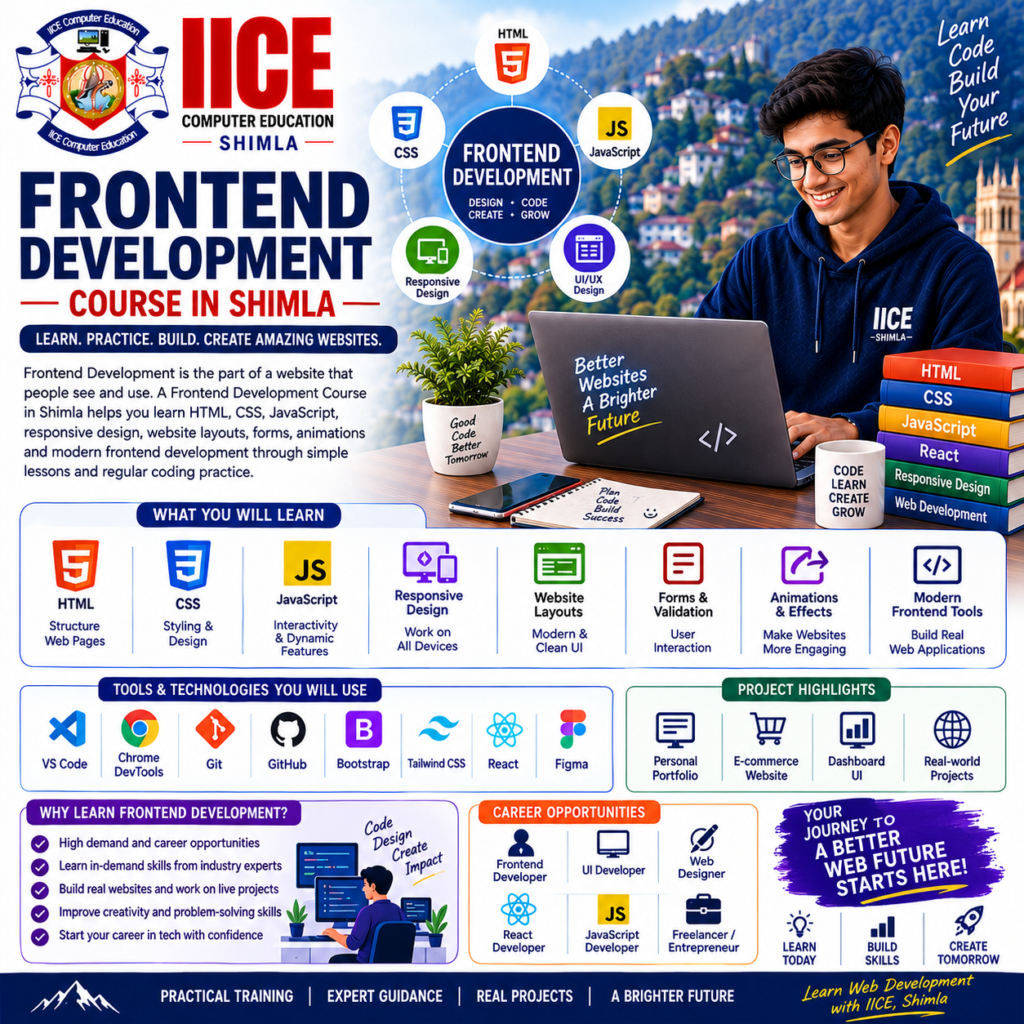
Frontend Development Course in Shimla
Introduction
A Frontend Development Course in Shimla helps students learn how to create the part of a website that people see and use. Students can learn HTML, CSS, JavaScript, responsive design, website layouts, forms, animations, and modern frontend development through simple lessons and regular coding practice.
At IICE Computer Education Shimla, students can learn step by step and build practical websites instead of studying only theory.
Frontend Development can be started by beginners. Students can first learn how to create a simple webpage, then add colours, images, menus, buttons, forms, and interactive features.
As their skills improve, they can learn modern frontend technologies and create websites that work smoothly on computers, tablets, and mobile phones.
What Is Frontend Development?
Frontend Development is the part of web development that focuses on everything a visitor can see and interact with on a website.
For example, when you open a website, the following are usually part of the frontend:
- Navigation menu
- Images
- Text
- Buttons
- Forms
- Cards
- Sliders
- Page layouts
- Animations
In simple words:
Design → Code → Make Interactive → Test → Improve
The frontend connects the user with the website.
Why Learn Frontend Development?
Almost every business and organization needs a website that is easy to use and looks good on different devices. Frontend developers help create this visible and interactive part of websites and web applications.
Learning frontend development can help students create personal websites, business websites, portfolios, landing pages, dashboards, and interactive web applications.
Key Benefits
- Learn website development
- Learn HTML and CSS
- Learn JavaScript
- Create responsive websites
- Understand website layouts
- Build interactive pages
- Learn frontend frameworks
- Practise modern web design
- Create mobile-friendly websites
- Work on real projects
- Build a coding portfolio
- Develop practical web skills
Frontend Development Course for Beginners
A Frontend Development Course in Shimla can be suitable for school and college students, graduates, job seekers, freelancers, digital marketing learners, and beginners who want to learn website development.
Students do not need advanced programming knowledge to begin. They can start with HTML and CSS and gradually learn JavaScript and modern frontend development.
What Will You Learn?
Students can learn how to convert a webpage idea or design into a working website.
The learning journey can include:
HTML → CSS → Responsive Design → JavaScript → DOM → APIs → React → Frontend Projects
Students can also learn how to test their websites, find coding errors, improve page layouts, and make websites easier to use.
Frontend Development Course Syllabus
The syllabus is divided into 4 major modules to make learning simple and organized.
Module 1: HTML & Web Page Structure
- Introduction to Frontend Development
- How Websites Work
- HTML Fundamentals
- HTML Elements
- Headings and Paragraphs
- Links and Images
- Lists
- Tables
- Forms
- HTML5 Structure
- Semantic HTML
- Audio and Video
- Basic Accessibility
- Web Page Structure
- Basic Website Project
Module 2: CSS & Responsive Web Design
- Introduction to CSS
- CSS Selectors
- Colours and Fonts
- Backgrounds
- Borders
- Margins and Padding
- Box Model
- Display Properties
- Positioning
- Flexbox
- CSS Grid
- Responsive Design
- Media Queries
- Mobile-Friendly Layouts
- Website Navigation
- Cards and Sections
- Basic Animations
- Responsive Website Project
Module 3: JavaScript & Interactive Websites
- Introduction to JavaScript
- Variables
- Data Types
- Operators
- Conditions
- Loops
- Functions
- Arrays
- Objects
- Events
- DOM Manipulation
- Form Validation
- Interactive Buttons
- Dynamic Content
- JavaScript Modules Basics
- JSON
- Fetch API Basics
- JavaScript Project
Module 4: Modern Frontend Development & Projects
- Introduction to Frontend Frameworks
- React Fundamentals
- Components
- Props
- State Basics
- Events in React
- Conditional Rendering
- Lists and Forms
- API Integration
- Frontend Application Structure
- Git and GitHub Basics
- Website Testing
- Basic Performance
- Browser Developer Tools
- Deployment Basics
- Final Frontend Project
- Project Testing
- Project Presentation
Learn HTML
HTML creates the basic structure of a webpage.
Students can learn how to add:
- Headings
- Paragraphs
- Images
- Links
- Tables
- Forms
- Buttons
- Videos
- Sections
For example, students can create a simple webpage with:
Heading → Image → Description → Button → Contact Form
This gives beginners a starting point for creating websites.
Learn CSS
CSS controls the appearance of a webpage.
Students can learn how to change:
- Colours
- Fonts
- Spacing
- Borders
- Backgrounds
- Layouts
- Button styles
- Image sizes
They can also learn Flexbox and CSS Grid to create organized and modern website layouts.
Learn Responsive Web Design
People use websites on different screen sizes. A website should therefore be easy to use on mobile phones, tablets, laptops, and desktop computers.
Students can learn responsive techniques such as media queries, flexible layouts, Flexbox, and CSS Grid.
The goal is simple:
Desktop → Tablet → Mobile
The website should adjust its layout according to the device.
Learn JavaScript
JavaScript makes a webpage interactive.
Students can learn how JavaScript can be used for:
- Buttons
- Menus
- Forms
- Calculators
- Image sliders
- Pop-ups
- Dynamic content
- Form validation
Instead of creating only static pages, students can use JavaScript to make websites respond to user actions.
Learn DOM Manipulation
The DOM allows JavaScript to work with webpage elements.
For example, when a user clicks a button, JavaScript can change text, hide an element, display a message, or update information on the page.
Students can learn these concepts through simple practical exercises.
Learn APIs
Frontend applications often need information from other systems.
Students can learn the basic idea of APIs and how a frontend application can request information and display the response.
For example:
Frontend → API Request → Data → Webpage
They can also learn basic JSON and Fetch API concepts.
Learn React
React is a popular technology used to build interactive user interfaces.
Students can learn basic concepts such as:
- Components
- Props
- State
- Events
- Lists
- Forms
- Conditional rendering
- API integration
Learning React can help students understand how larger frontend applications are organized into reusable parts.
Practical Frontend Development Projects
Projects help students use their coding knowledge to create working websites.
1. Responsive Business Website
Students create a business website with sections such as Home, About, Services, Gallery, and Contact.
Final Output: Responsive business website.
2. Personal Portfolio Website
Students create a personal portfolio showing their introduction, skills, projects, education, and contact information.
Final Output: Professional portfolio website.
3. Interactive Product Page
Students create a product page with images, product details, buttons, pricing information, and interactive features.
Final Output: Interactive product webpage.
4. React-Based Web Application
Students combine React concepts and API integration to create a simple interactive application.
Final Output: Working frontend web application.
Who Can Join a Frontend Development Course?
A Frontend Development Course in Shimla can be suitable for:
- School students
- College students
- Graduates
- Job seekers
- Beginners
- Freelancers
- Digital marketing learners
- Web development learners
- Computer students
- Technology enthusiasts
Students can start with basic computer knowledge and gradually develop their coding skills.
Do I Need Coding Knowledge?
No advanced coding knowledge is required to begin.
Students can start with HTML and CSS before moving to JavaScript, APIs, React, and other frontend technologies.
Learning one technology at a time makes it easier for beginners to understand how websites are created.
Is Frontend Development Difficult?
Frontend Development has several technologies, but beginners can learn them step by step.
Students can start by creating a simple webpage, then learn styling, responsive layouts, JavaScript, APIs, and modern frontend frameworks.
Regular practice is important because coding becomes easier when students write and test their own code.
Frontend Development Training in Shimla
Students searching for Frontend Development Training in Shimla should look for practical training that includes HTML, CSS, JavaScript, responsive design, frontend frameworks, APIs, and projects.
A useful training program should allow students to create websites, test them on different devices, find coding errors, and improve their designs.
Before joining, students should confirm the latest course duration, fees, batch timings, syllabus, technologies, certification, and project structure with the institute.
Career Opportunities After Frontend Development
Frontend Development skills can be useful in software companies, startups, digital agencies, businesses, and freelance work.
Depending on education, skills, and experience, students can explore roles such as:
- Frontend Developer
- Web Developer
- UI Developer
- JavaScript Developer
- React Developer
- Web Designer with Development Skills
- Junior Frontend Developer
- UI Engineer
- Frontend Development Intern
Students can further improve their skills by learning React, TypeScript, Next.js, Node.js, UI/UX concepts, APIs, Git, and modern web development tools.
Why Choose IICE Computer Education Shimla?
Frontend Development is best learned through coding and practical work. Students need opportunities to create webpages, make them responsive, add interactive features, connect APIs, and build complete projects.
IICE Computer Education Shimla provides computer and technology training with a practical learning approach. Students choosing a Frontend Development Course in Shimla can learn through structured lessons, coding exercises, practical assignments, trainer guidance, and project development.
Key Reasons to Choose IICE
- ISO 9001:2015 Certified
- Government Registered
- MSME/Udyam Registered
- Practical computer training
- Beginner-friendly learning
- HTML and CSS training
- JavaScript training
- Responsive web development
- Modern frontend technologies
- API integration
- Project-based learning
- Trainer guidance
- Career-focused learning
- Classroom training in Shimla
IICE can be considered by students who want to learn how to create modern, responsive, and interactive websites through practical coding.